POSTGRESQL
sudo apt update -y
sudo apt install postgresql postgresql-contrib
Verificamos que este activa:
sudo systemctl status postgresql
To log in to your PostgreSQL instance, first switch to the postgres user. The Postgres user comes included by default with the installation of PostgreSQL. Then run the psql command as shown.
$ sudo -i -u postgres
$ psql
\q
exit
Chequear si la base de datos esta activa
sudo pg_isready
INSTALAR PGADMIN4
https://www.pgadmin.org/download/pgadmin-4-apt/
cat /etc/*release
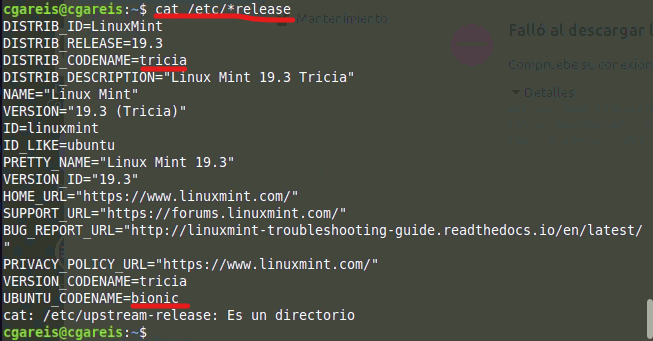
Setup the repository
Install the public key for the repository (if not done previously):
sudo curl https://www.pgadmin.org/static/packages_pgadmin_org.pub | sudo apt-key add
Create the repository configuration file:
sudo sh -c 'echo "deb https://ftp.postgresql.org/pub/pgadmin/pgadmin4/apt/$(lsb_release -cs) pgadmin4 main" > /etc/apt/sources.list.d/pgadmin4.list && apt update'
En mi caso terndria que poner a mano el codename ya que para tricica no habia. O esditarlo luego en "Fuentes de Software":
sudo sh -c 'echo "deb https://ftp.postgresql.org/pub/pgadmin/pgadmin4/apt/bionic pgadmin4 main" > /etc/apt/sources.list.d/pgadmin4.list && apt update'
sudo apt update
Install pgAdmin
Install for both desktop and web modes:
sudo apt install pgadmin4
Install for desktop mode only: sudo apt install pgadmin4-desktop
Install for web mode only: sudo apt install pgadmin4-web
Configure the webserver, if you installed pgadmin4-web:
sudo /usr/pgadmin4/bin/setup-web.sh
CONTRASEÑA
La contraseña por defecto es postgres pero si necesitamos cambiarla:
sudo -i -u postgres
psql
alter user postgres with password '1234';
ALTER ROLE
\q
exit
SI NO FUNCIONA
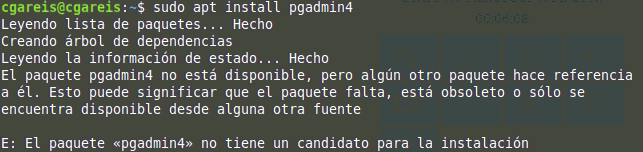
Revisar el codename de nuestra distribucion con: lsb_release -cs
Si estamos en linux mint revisar el codename de Ubuntu con: cat /etc/*release
Si no podemos abrir el archivo vamos a inicio / "Fuentes de Software" / Repositorios adicionales / Añadir
y pegamos la direccion alli
"The repository 'http://apt.postgresql.org/pub/repos/apt tricia-pgdg Release' does not have a Release file., W:Updating from such a repository can't be done securely, and is therefore disabled by default., W:See apt-secure(8) manpage for repository creation and user configuration details., E:The repository 'https://ftp.postgresql.org/pub/pgadmin/pgadmin4/apt/tricia pgadmin4 Release' does not have a Release file."
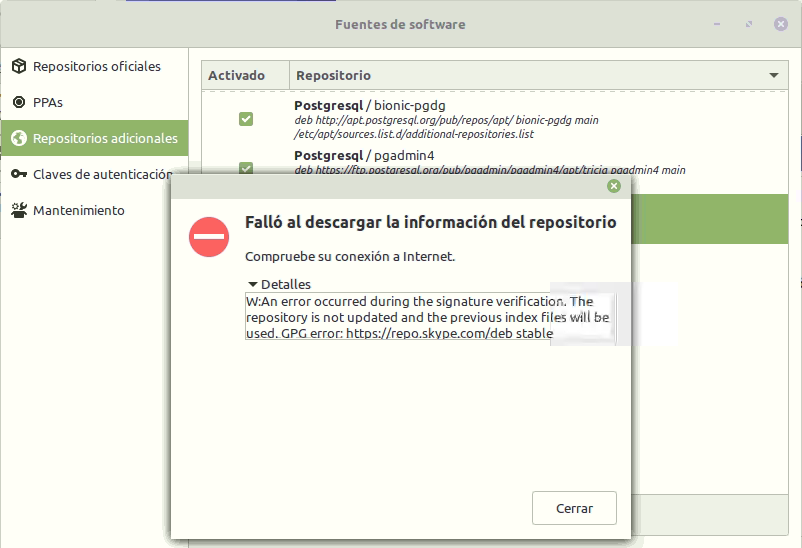
si no instala el pgadmin4 verificar que este seleccionado, si nos marca error, probar cambiar el codename en el repo de tricica (linux Mint) a bionic (Ubuntu)
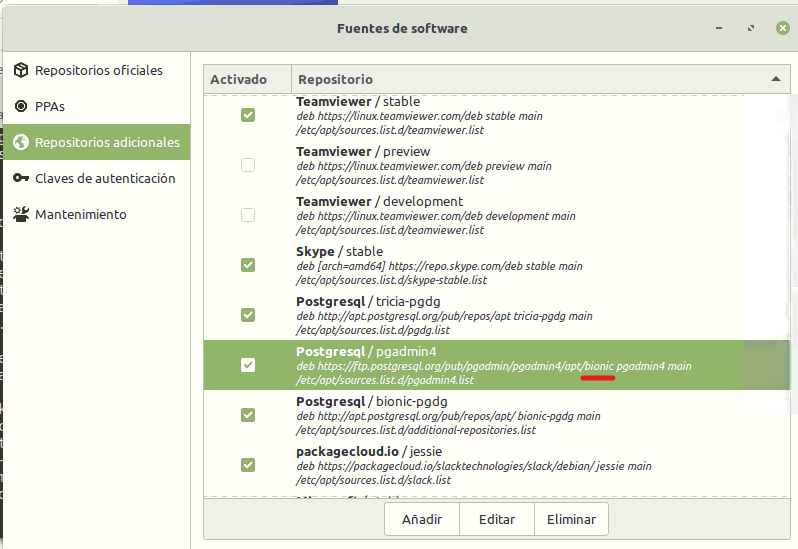
deb https://ftp.postgresql.org/pub/pgadmin/pgadmin4/apt/bionic pgadmin4 main